Channels
You reach people two ways: email and LinkedIn. This page is how you decide which one gets tried first, and how often anyone hears from you.
You'll find all of it in your outreach settings.
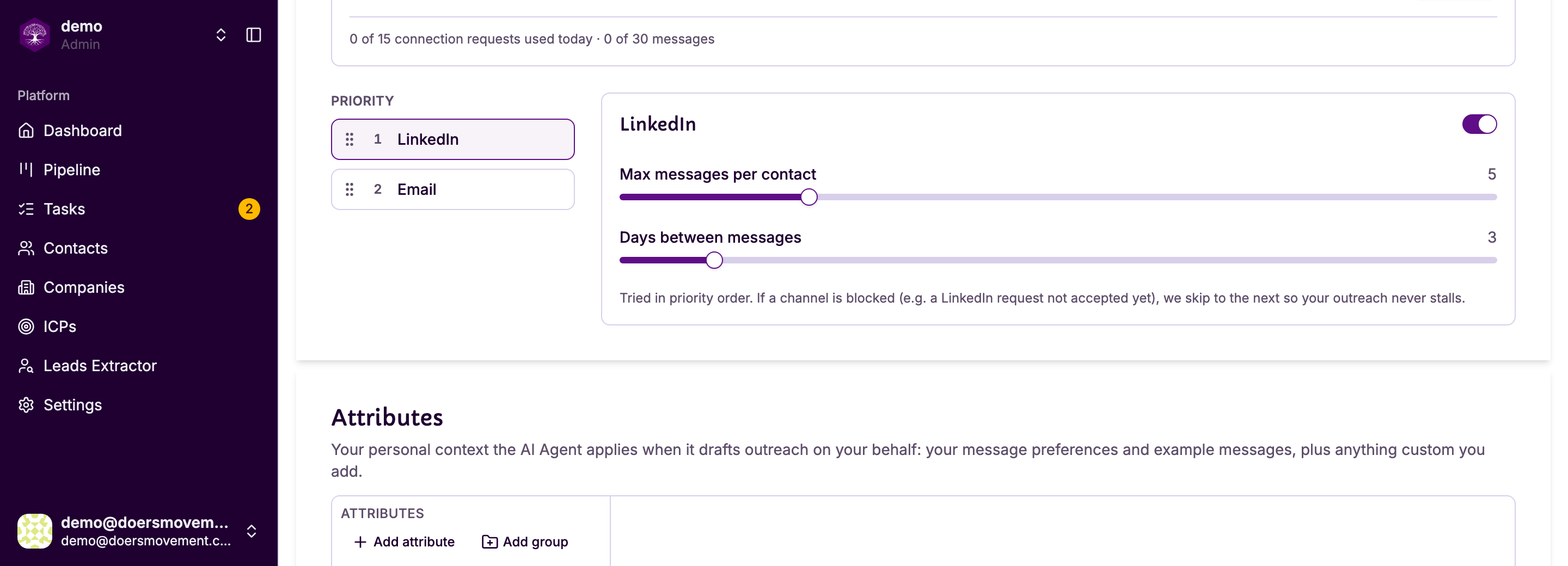
Priority: which channel is tried first
The Priority list is drag-to-reorder. Whatever sits at the top is tried first for every contact.
Doers Movement walks that list in order and takes the first channel that's actually usable right now. As the settings page puts it: "Tried in priority order. If a channel is blocked (e.g. a LinkedIn request not accepted yet), we skip to the next so your outreach never stalls."
A channel gets skipped when:
- There's no address for it — no email on the contact, or no LinkedIn profile
- You're not connected yet on LinkedIn (a request may still be waiting)
- You've already hit the caps below for this person
Each channel also has a switch to turn it off entirely. Turn LinkedIn off and only email is ever used, whatever the priority says.
Caps: how much one person hears from you
Both settings are per contact, per channel — they don't count everyone in your CRM, and they don't mix channels.
| Setting | What it does |
|---|---|
| Max messages per contact | The most messages this person will ever get on this channel. Once reached, the channel is done for them and the next one is tried. When every channel is done and they never replied, they move to Not Responded (see Statuses and lifecycle). |
| Days between messages | The wait before this channel messages them again. |
So with LinkedIn set to 5 and email set to 5, one person could receive up to ten messages across their lifetime — five on each.
And a limit that spans both
There's also a wait that counts every channel together, so a contact can't get an email on Monday and a LinkedIn message on Tuesday just because they're different channels. It's the "wait this many days" setting, and the page says plainly that it counts every channel.
Think of the two as different jobs:
- Days between messages stops one channel being repetitive
- The cross-channel wait stops you being everywhere at once
If prospects say they're hearing from you too often, raise the cross-channel wait first. That's the one that governs how present you feel overall.
When a message has to wait
These settings don't only guide Autopilot. They apply however a message is started: moving someone to To Contact, pressing Generate message, or asking your AI Agent. That is what stops the same person hearing from you twice in three days because two things asked for a draft at once.
When a message would break one of your settings, you're told which one and when the next message is allowed — for example "You set 3 days between LinkedIn messages. The next LinkedIn message to Piotr can go out on Oct 2."
Sometimes you know better: they asked you to follow up tomorrow. Press Write anyway and the draft is written straight away, just this once. Your AI Agent works the same way — it tells you the date and asks, and only writes anyway if you say so.
Messages you logged yourself, and conversations brought in from LinkedIn, count too, so the spacing reflects everything they've actually received.
A worked example
LinkedIn first, email second. A qualified contact with both an email and a LinkedIn profile:
- LinkedIn is tried first. You're not connected yet, so it's skipped — not failed. A connection request may be on its way.
- Email is tried next, and a draft is written for you to review.
- Days later they accept your connection. Now LinkedIn is usable, so the next message goes there — as long as the cross-channel wait has passed.
Nothing was lost, and nobody got two messages in one day.