Leads Extractor (from LinkedIn)
This is not the same as importing your own connections. The Leads Extractor pulls people out of other people's public posts and needs nothing connected. To bring in the people you are already connected to, see Connect your LinkedIn account.
Some of your best leads already raised their hand. They commented on or liked a relevant LinkedIn post. The Leads Extractor pulls those people straight into your CRM as contacts, so you can act on warm interest instead of cold lists.
You'll find it in the sidebar under Leads Extractor.
Two ways to extract
When you click Extract Leads, the first step asks where to pull leads from:
- Post Engagements — you already have a specific post in mind. Paste its link and we pull everyone who commented or liked it.
- Profile / Company Posts — you have a creator or a company in mind, not a single post. Paste their profile or company link, choose how far back to look, and we sweep every post they published in that window and pull the engagers from all of them.
Both land leads in your CRM exactly the same way, with the same persona, teammate, enrichment, and no-duplicate behaviour described below.
How it works
Click Extract Leads and a short wizard walks you through five steps:
- Source — pick Post Engagements or Profile / Company Posts.
- Setup — optionally assign every extracted contact to a persona and to a teammate.
- Target — tell us where to look (a post link, or a profile/company link plus a time window). Everything is checked as you type, so you know it's valid before you continue.
- Enrichment — decide whether to enrich each lead (see below).
- Review — confirm what you're about to do, then Start Extraction.
Once you start, the extraction runs in the background. A row appears in the list with a live progress bar so you can watch leads come in while you keep working.
Getting the right URL
You need the link to the post itself, not someone's profile or feed:
- Find the LinkedIn post you want to extract engagements from.
- Click the post to open it (optional, but recommended).
- Click the 3-dots (…) menu on the post.
- Choose Copy link to post, or copy the URL from your browser's address bar.
- Paste it into the URL step.
A valid link looks like https://www.linkedin.com/posts/...activity-.... We extract both commenters and likers from the post.
Extracting from a profile or company
Choose Profile / Company Posts when you'd rather harvest a whole stream of recent activity than hunt down individual post links. It's perfect for a founder who posts regularly, or a company page whose audience is full of your buyers.
- Open the LinkedIn profile or company page you care about and copy its link from your browser's address bar (a profile looks like
linkedin.com/in/...; a company looks likelinkedin.com/company/...). - Paste it into the Target step. We automatically recognise whether it's a person or a company — you don't have to tell us.
- Use the Pick posts in the last X days slider to choose a window from 1 to 30 days.
- We find every post they published in that window and extract the commenters and likers from all of them.
A wider window finds more posts and more leads — and, if enrichment is on, costs a little more. Start narrow (a week or two) and widen it if you want more reach.
Enrichment (optional)
Leave Data Enrichment on and, for every extracted lead, we fetch their LinkedIn profile to:
- fill in their full name and job title, and
- create and link their company.
Turn it off if you only want the basics (name, LinkedIn link, and the LinkedIn headline shown on the post). You can always enrich later.
We never enrich the same person twice. If a lead is already in your CRM and already enriched, we skip the paid profile fetch and mark the row skipped, so you don't pay to learn the same thing again.
No duplicates
Re-running an extraction (or extracting from several posts where the same person engaged) won't clutter your CRM. People are recognized by their LinkedIn profile (however the link is written), then by their email. An existing contact is never duplicated or overwritten: we only fill in details it was missing. The same person engaging on five posts is still one contact.
Where extracted leads land
Every extracted person becomes a contact with their source recorded as Lead Extractor, so you can always tell where a lead came from (alongside contacts added manually, by CSV import, or by your AI Agent). If you chose a persona and an assignee in Setup, they're applied automatically.
From there they're regular contacts. Research, qualify, and reach out just like any other.
Next
- Contacts: work the leads you just brought in
- Importing your contacts (CSV): bring in an existing spreadsheet instead
- Starting AI work: let your AI Agents research and qualify the new leads
Tracking your LinkedIn connections imports
This page isn't only for post extractions. If you've connected your LinkedIn account, your connections imports show up here too, so there's one place to watch everything arriving.
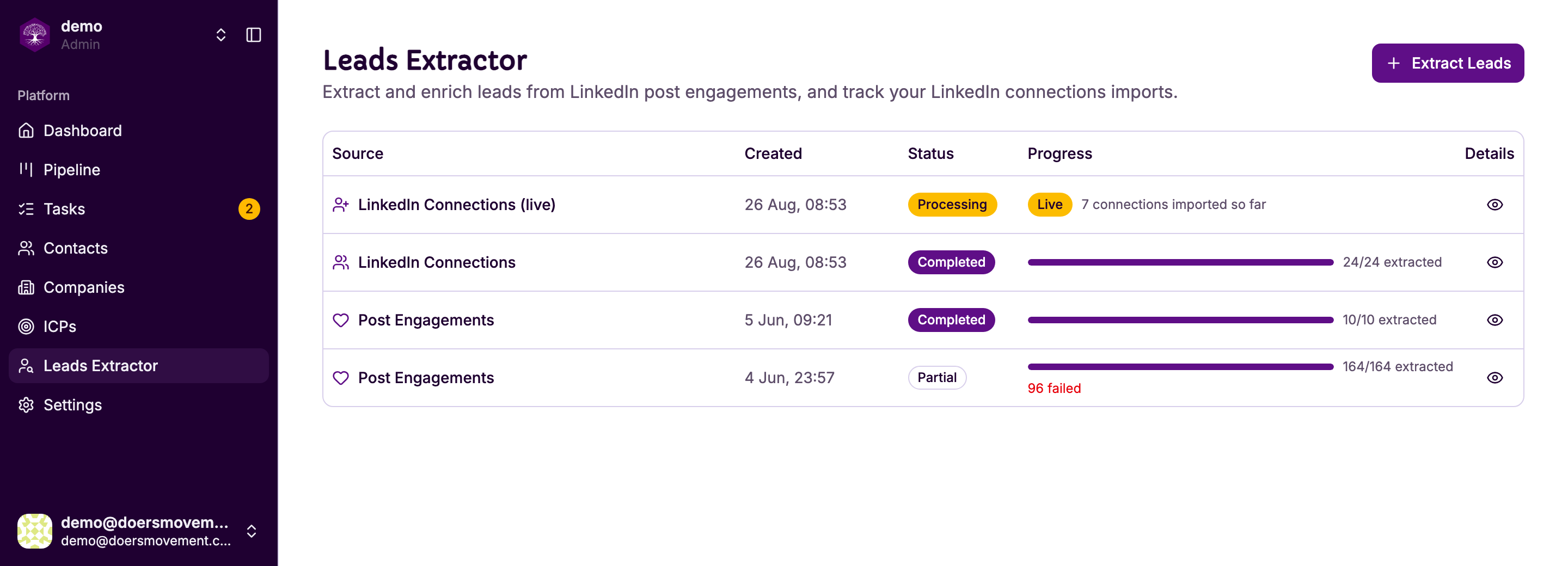
You'll see two kinds of row:
| Row | What it is |
|---|---|
| LinkedIn Connections | The one-off import of the network you already had. It has a progress bar and finishes. |
| LinkedIn Connections (live) | The ongoing one, from "keep importing new connections". It stays Live and counts up — "7 connections imported so far". |
The live row never says Completed, and that's correct: it has no finish line. As long as your account is connected and the setting is on, it keeps watching for new connections.
Both kinds of connections row bring people in as your contacts — they're your network, so they arrive owned by you, with no assignee to pick in Setup the way a post extraction has one.
Click the eye on any row to see the detail of what came in.