Staying safe on LinkedIn
LinkedIn restricts accounts that behave like software. A restricted account is far worse than a slow one — it can cost you the network you spent years building. Everything on this page exists to make sure that doesn't happen to you.
Your limits
In Outreach settings you control:
| Setting | What it does |
|---|---|
| Connection requests per day | How many requests can go out in a day |
| Messages per day | How many messages can go out in a day |
| Send on these days | Which days send at all — leave weekends off if that's your pattern |
| Working hours | The part of the day sending happens, in your own timezone. Drag either end of the slider — anything from a short afternoon to the whole day |
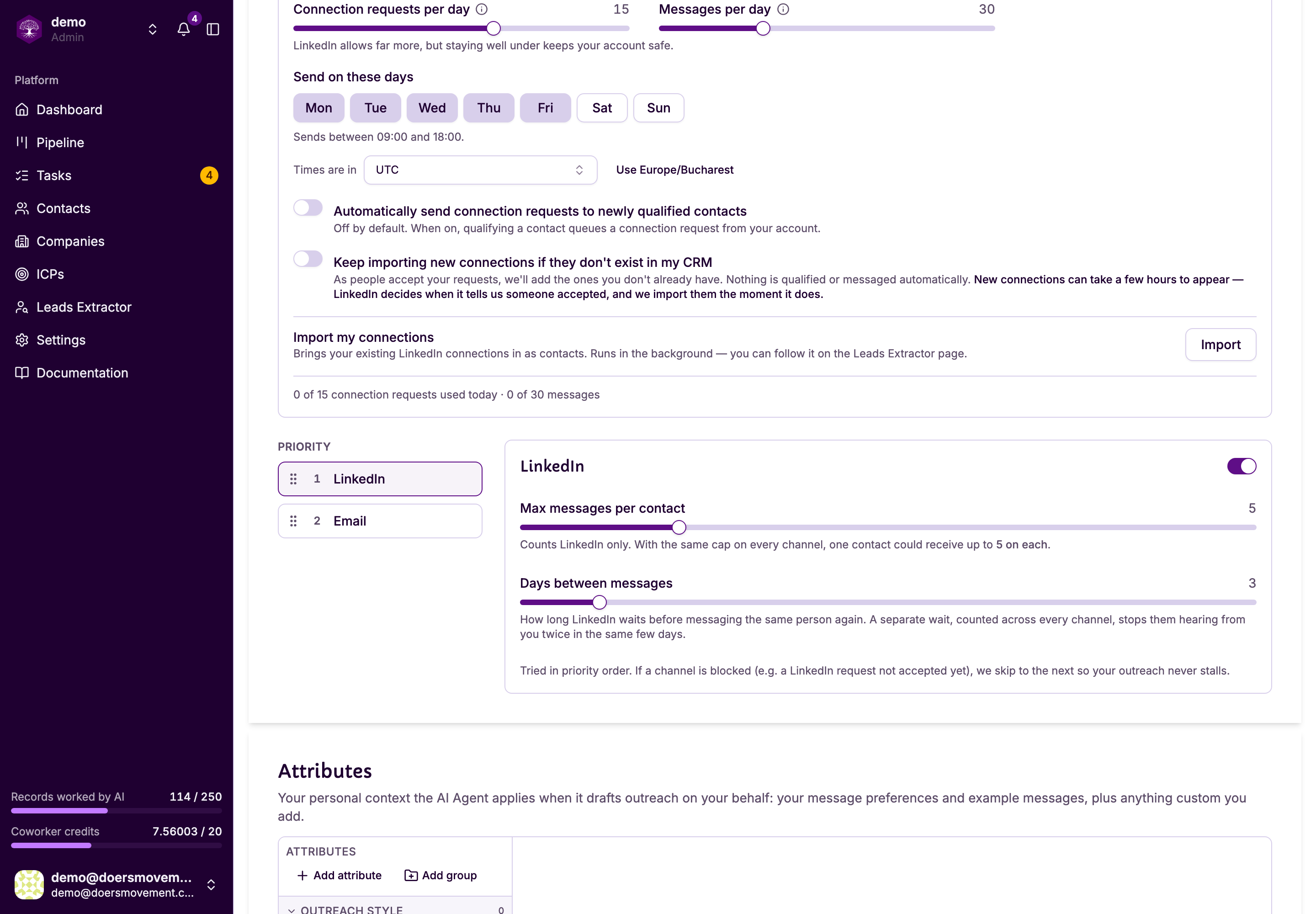
Set either count to 0 to turn that off entirely. The settings page says so plainly: "Off — no connection requests will be sent."
Start lower than you think you need, especially on a newer account. You can raise the limits any time; you can't undo a restriction.
Your limits have to fit your working hours. Every send is at least your minimum gap apart, so 25 requests plus 50 messages at 8 minutes apart needs 10 hours — more than a 09:00–18:00 day. If you set a combination that can't fit, we'll say so and tell you which number to change.
How long your working day should be
A longer day lets the same number of sends spread out further, but real people don't send LinkedIn requests at 3am. If you set working hours longer than 15 hours, Doers Movement still saves them — it's your call — and shows a warning under the slider, because a day that long no longer looks like one person at a desk.
The safest choice is roughly your real working day. It's also what the people you contact expect: a request that lands at 10:00 on a Tuesday reads like you, one at 02:00 doesn't.
You can also ask your AI Agent to change your working hours. It asks you to confirm first, and passes on the same warning if the day is very long.
Why things get queued
Even inside your limits, sending is spread out:
- Your sends are scattered across your working hours, with uneven gaps, so your activity doesn't look mechanical
- Your full daily limit still goes out on every working day, as long as there's that much waiting
- Nothing sends outside your working hours or on a day you've switched off
- When you hit a daily limit, the rest waits for the next working day rather than being dropped
So when you approve a message you'll often see something like "it'll send around 16:45." That is the pacing working. Nothing is lost, and nothing needs re-doing.
Don't approve the same message repeatedly because it hasn't appeared yet. It's queued. Sending it twice is the pattern this whole system exists to avoid.
When a limit is reached
You'll be told, in plain terms — for example "You've used all 15 connection requests for today. This resumes around 9:00." Anything queued stays queued and goes out when your window opens again.
If your account needs reconnecting
If LinkedIn asks you to confirm it's you, sending pauses rather than failing. You'll see a Reconnect my LinkedIn prompt. Reconnect, and the queue picks up where it left off.
Pausing is deliberate: continuing to push at an account LinkedIn has already flagged is how a warning becomes a restriction.
Sharing one LinkedIn account across a team
Don't. Each teammate connects their own account and sends from their own name. If two people did somehow point at the same LinkedIn account, the limits are counted against the account, not per person — because that's what LinkedIn sees.
Related
- Connect your account
- Connection requests
- Plans and credits: a separate kind of limit