How Qualification Works
The whole point of Doers Movement is to spend your time only on people worth selling to. You decide what counts as Qualified by setting your qualification rules, and your AI Agent applies them consistently to every company and person, showing the reasoning behind each verdict.
Facts and rules work together
There are two different things at play, and it helps to keep them straight:
- Attributes are the facts. They are what the Researcher gathers about a company or person, and every fact comes with a source. See Attributes.
- Qualification rules are the checks you want the AI to run, like "do they have 2+ locations?" or "are they hiring salespeople?" You write each rule in plain language, and the AI answers it from the facts.
When it is time to decide, your AI Agent reads the facts the Researcher gathered and uses them to answer your checks. Good facts in, trustworthy verdicts out: that is why the two go hand in hand.
Qualification rules are checks you choose
- Company-level rules live on your ICP: things that describe a company worth pursuing.
- Person-level rules live on your persona: things that describe a person worth pursuing.
You set them once. Your AI Agent then applies them every single time, so verdicts stay consistent across hundreds of prospects. A contact only counts as Qualified when both the company-level checks and the person-level checks pass.
Setting your qualification rules
You define rules in two places: on the ICP (for the company) and on each persona (for the person). Open an ICP from your ICPs list to get started.
Company-level: on the ICP
The ICP page gives you two kinds of company checks:
1. "Who qualifies": quick filters. On the ICP, set the hard limits that do not need any AI thinking: minimum/maximum employees, minimum/maximum revenue, industries to include or exclude, locations, company types, the tools they use (or don't), and which department you are selling into. A company that falls outside these is filtered out before the AI even reasons about it.
2. "Who qualifies, AI-evaluated rules": your judgment calls. On the ICP's Overview tab, click Add rule and fill in two things:
- Rule name: a short label, e.g. "Has a dedicated security team."
- How should the agent check this? A plain-language description of what the AI should look for in the company's research.
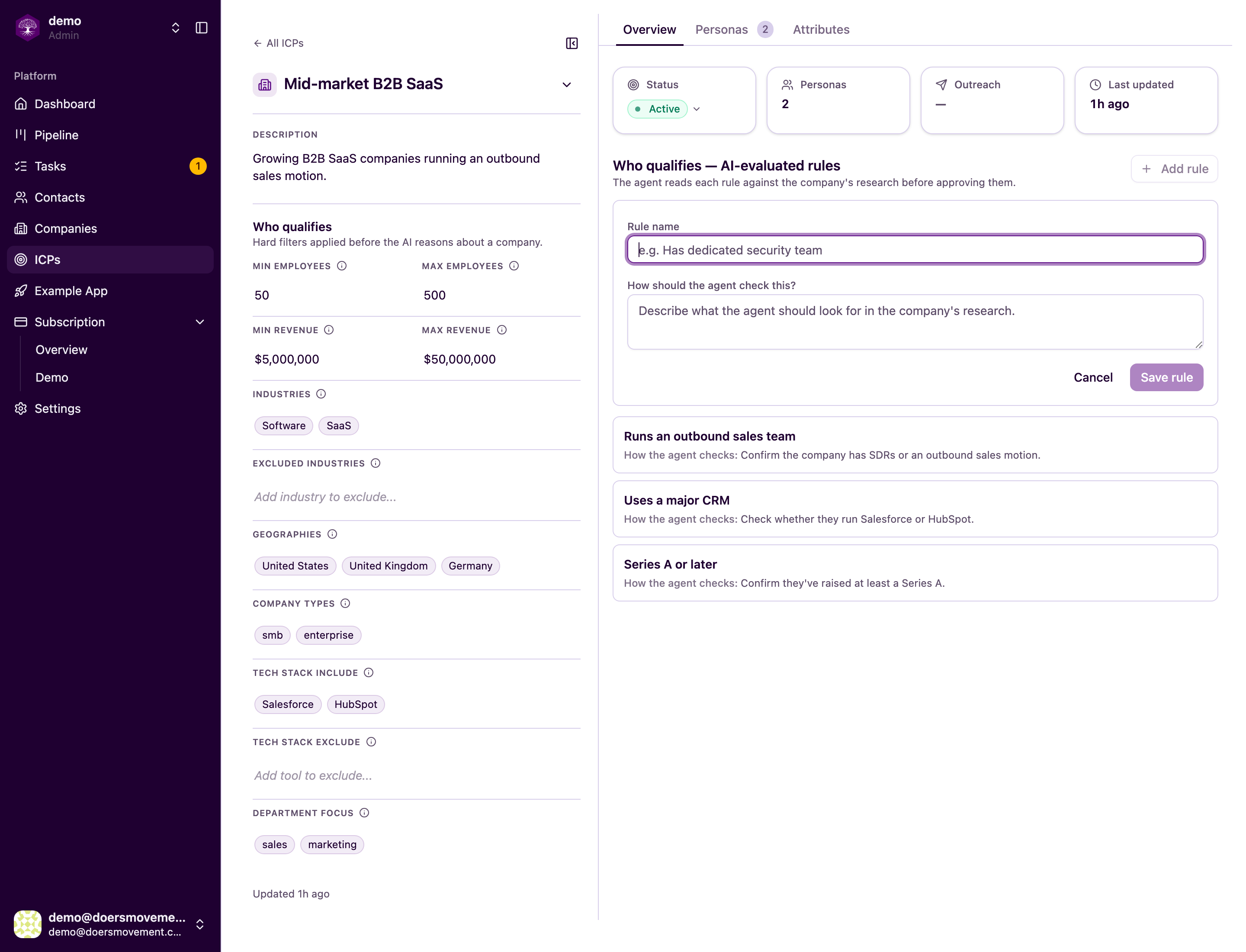
Your rules appear as cards; hover to edit or delete any of them. The AI checks each one against the facts the Researcher gathered and shows its reasoning.
Person-level: on the persona
Open the ICP's Personas tab, pick a persona, and go to its Contact qualification rules sub-tab. Click Add rule and fill in the same two fields (Rule name plus how should the agent check this?), but here they describe a person worth pursuing rather than a company.
If a persona has no rules, any contact at a qualified company will match it. Add rules to be more selective about who inside a qualified company is actually worth pursuing.
When an ICP is locked, you can't change its filters, rules, or its personas' rules. Clone the ICP first, then edit the copy. See ICPs.
How a verdict is reached, in four stages
Before the stages below, anyone your AI Agent hasn't screened yet is screened first, for free. A clear not-a-fit ends there as Disqualified at screening, for no credits, so you never pay for a full check free screening already answered. Qualify in depth anyway runs the full check whenever you want it. See Possible Fit and screening.
Your AI Agent works through the checks in order, like a series of gates:
- Company basics: does the company's industry, size, and location match your ICP?
- Company qualification rules: your custom company rules, each checked with evidence.
- Person basics: does this person's seniority and role match the persona?
- Person qualification rules: your custom person rules, checked with evidence.
The verdicts you'll see
| Verdict | What it means |
|---|---|
| Qualified | Worth pursuing. They match your rules. |
| Disqualified | They don't match your rules. |
| Insufficient data | There isn't enough info yet to decide. |
| Disqualified (company) | The company didn't qualify, so the person is set aside, but kept, in case the company qualifies later. |
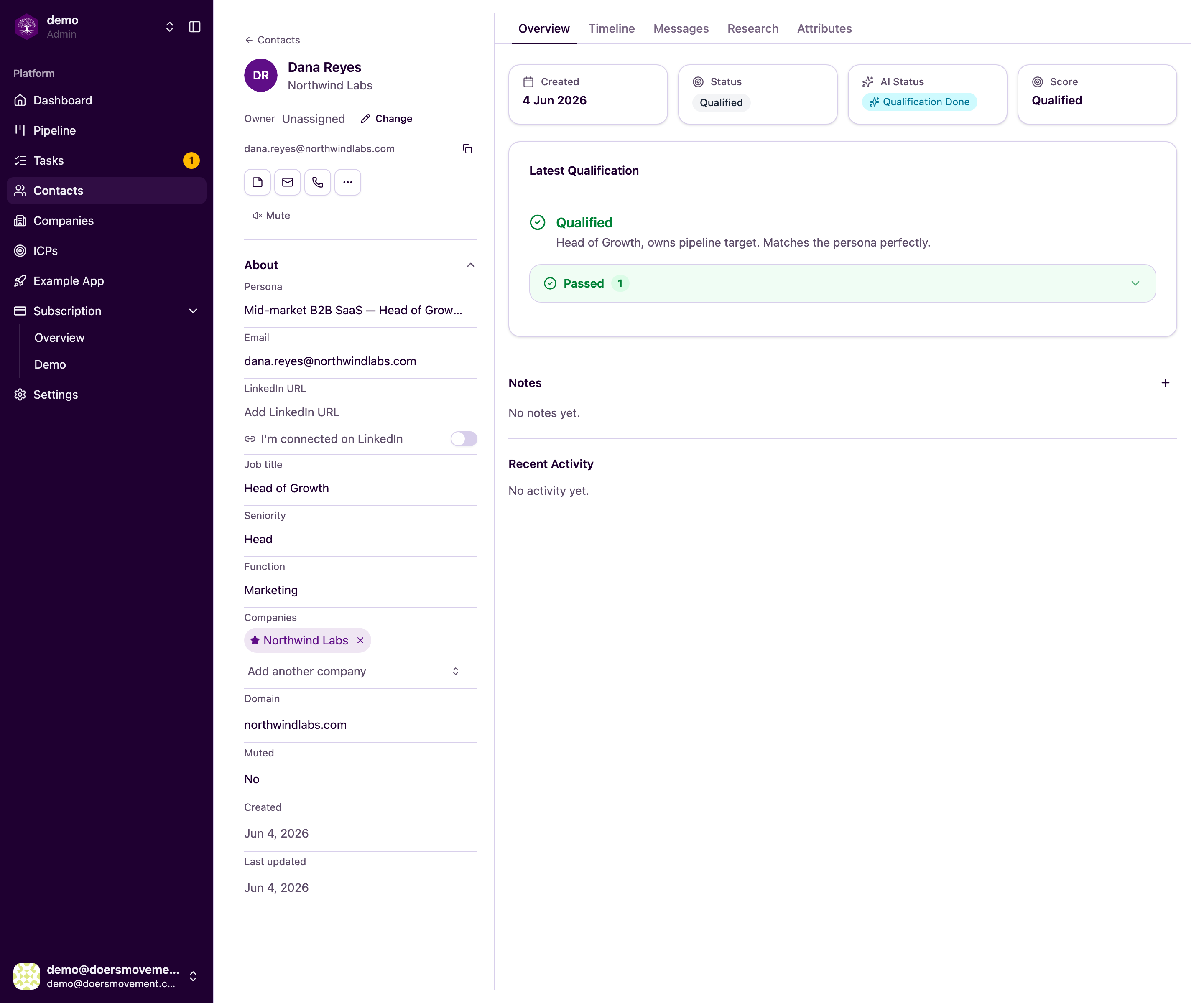
That last one matters: you never lose a promising person just because their company wasn't ready today.
Every verdict comes with its reason, even when the Qualifier stops before it reaches your persona rules. You'll see it at the top of the contact's qualification, above the persona tabs, in plain words. For example:
- Disqualified: the primary company doesn't match this ICP.
- Insufficient data: the primary company can't be qualified yet.
- Insufficient data: we couldn't re-check the company right now. Try again shortly.
- Disqualified: no persona in this ICP fits this contact's role.
- Insufficient data: we couldn't work out this contact's role.
So a contact never ends up Disqualified without you being able to see why.
"Disqualified (company)" is a verdict, a result the AI reached, not a place in your funnel. Where a record sits in your pipeline is something you control separately. See Statuses & the AI lifecycle.
Marking a company Qualified yourself
Sometimes you already know a company is a fit. Open it, pick the ICP it matches under Not qualified yet, and click Mark Qualified, or just tell your AI Agent "mark Acme qualified for Fintech". Either way the verdict is recorded as your decision, against an active ICP, so your pipeline always shows why a company is Qualified. A company can't be set to Qualified any other way: Qualified always comes with a verdict.
The same goes for people: a contact becomes Qualified by being qualified against a persona (or by picking the persona they match and clicking Mark Qualified), never by moving them to Qualified by hand.
Ruling a company out works per ICP. Disqualifying it (the Disqualify company button, or "rule Acme out" to your AI Agent) rules it out for the ICP it currently matches, and marks its main contacts as disqualified with it. If it was also a fit for another ICP, that verdict still counts the next time it's qualified.
Re-judging as you learn
When you change your targeting or your rules, earlier verdicts are marked Outdated. Nothing is re-judged on its own, and that's on purpose: one small tweak to a rule would otherwise re-check every company you have, spending credits on verdicts that mostly wouldn't change. You choose what to re-judge, and when.
- To re-check a company against your new rules, open it and click Re-qualify next to its outdated verdict, or move it back to "To Qualify". You can also ask your main AI Agent to re-qualify it.
- To re-check a person, move the contact back to "To Qualify", or ask your main AI Agent to re-judge them. This re-scores the person against your personas using their company's current verdict, so re-qualify the company first if you changed its rules too.
The newest verdict for an ICP is the one that counts. If you tighten a rule and re-qualify a company against the same ICP, the new result replaces the old one: a company that no longer passes stops showing as Qualified. A company qualified for one ICP stays Qualified even if a different ICP later turns it down, because it's still a fit for the first one.
There's one case where the company is re-checked for you. If the ICP behind a company's verdict was discontinued or moved back to draft, or the company has no verdict yet, qualifying one of its contacts re-qualifies the company first and then the person. That re-check uses a record, like any qualification.
Either way, nothing is ever overwritten: your full history of every verdict and how it changed is kept. See Starting AI work.
This is the heart of the product: change your rules, re-judge, watch the verdicts change. Each round teaches you what a real qualified prospect actually looks like, and your targeting gets sharper over time.